
How a Final Grade Calculator Actually Works (Simple Explanation)
Use the RogerHub Final Grade Calculator to know exactly what you need on your final exam.
Final Grade Calculator — RogerHub
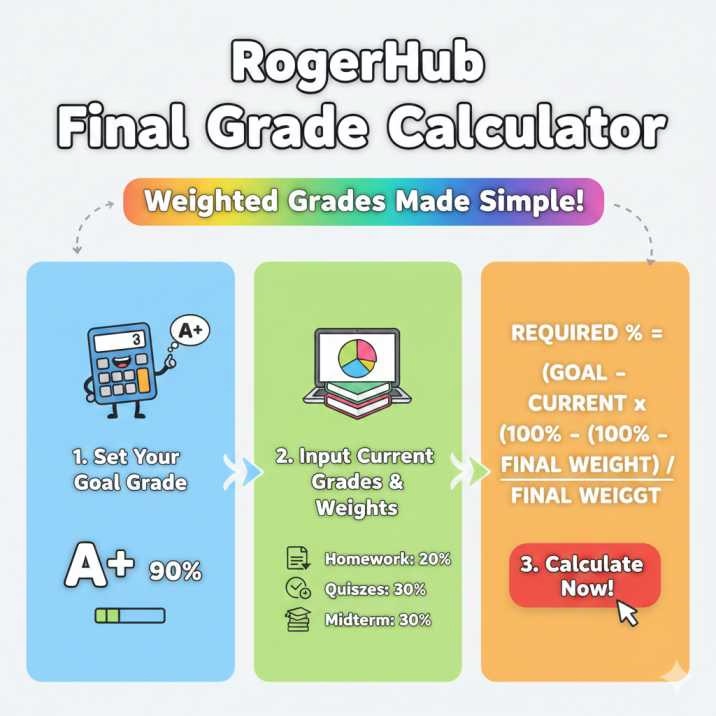
The RogerHub Final Grade Calculator is one of the most popular tools students use to figure out exactly what they need to score on their final exam to achieve their desired overall grade. It works by taking your current course grade, the weight of your final exam, and your target final grade, and then calculating the minimum score you must earn. This calculator uses the same weighted-average formula that schools and universities follow, making the results accurate and reliable. Whether you want to know the score needed to pass the class or reach a specific goal like an A or B, the RogerHub calculator gives you a clear answer within seconds. It’s fast, simple, and removes the stress of guessing your final exam requirements.
Most classes divide your grade into categories like homework, quizzes, tests, and the final exam. Each category has a percentage weight. This weight shows how much that category affects your final course grade.
But your final exam is usually taken at the end of the semester. That means it is not included when calculating your current grade. So the system temporarily scales up your completed categories to fill the space left by the final exam.
Final Grade Calculator (RogerHub-style)
Final Grade Calculator — RogerHub style
Add assignments/categories with their scores, totals, and weights. Leave weight blank for remaining items (or set them). Calculate the score you need on remaining work to reach a target final grade.
| Name | Score (earned) | Out of (max) | Weight (%) | Actions |
|---|
Quick steps: 1) Add rows for graded items and fill their weight. 2) If some work is not yet graded, leave weight empty (it counts as remaining). 3) Enter desired final % and click “Calculate needed on remaining.”
This method is used by almost every accurate final grade calculator online.
Why Grades Are Scaled When the Final Exam Isn’t Graded
Think of your grade like a family sharing chores.
If one member (final exam) is not doing their task yet, the remaining members (homework, quizzes, tests) must carry the load for now.
So until your final exam is graded:
- Homework weight increases temporarily
- Quiz weight increases
- Test weight increases
This lets the system calculate a clear and fair current grade.
When the final exam score is added, all the weights return to normal, and your true final grade is calculated.
Final Exam Requirement Formula (In Simple Words)
To find how much you need on your final exam to reach your target final course grade, use this formula:
Required Score = (Goal − Current × (100 − Final Weight)) / Final Weight
Where:
| Term | Meaning |
|---|---|
| Goal | The final grade you want (e.g., 85%) |
| Current | Your current grade before the final exam |
| Final Weight | How much the final exam is worth (e.g., 30%) |
Why This Method Is Reliable
This formula is based on weighted averages, the same math teachers and universities use to compute final grades.
If you want a formal, mathematical explanation, you can explore this detailed reference:
👉 Official formula explanation PDF: https://rogerhub.com/~r/final/formula.pdf
This PDF explains the logic behind the calculation and shows how your current grade adjusts when the final exam is not yet graded.
Step-by-Step Example Table
Let’s say you want an 85% overall grade.
Your current grade is 78%.
Your final exam is worth 30% of the total grade.
Step 1: Put the numbers in the formula
(Goal) = 85
(Current) = 78
(Final Weight) = 30
Step 2: Use the formula
Required = (85 − 78 × (100 − 30) / 100) / 30 × 100
Step 3: Final answer
This gives the minimum percentage you must score on your final exam to reach your goal.
Visual Breakdown Table
| Category | Score | Weight | Status |
|---|---|---|---|
| Homework | 85% | 20% | Graded |
| Quizzes | 92% | 25% | Graded |
| Tests | 78% | 25% | Graded |
| Final Exam | — | 30% | Not yet graded |
Your graded items (homework, quizzes, tests) temporarily fill the 70% of the course. The final exam is the remaining 30%.
Why This Formula Is Accurate
- It uses weighted averages
- It adjusts missing weights correctly
- It matches official university grading systems
- It works for any grading structure
- It is used by trusted websites like Roger Hub
How Final Grade Calculators Use This Method
A proper final exam calculator will:
- Read your current grade
- Detect ungraded categories
- Scale graded items
- Apply the exam weight
- Show the required exam score instantly
This helps students avoid stress and plan effectively.
How-To Guide: Calculate Your Required Final Exam Score
Below is a short how-to section (ideal for schema):
Step 1: Find your current grade
Check your course portal or add up all your graded items.
Step 2: Find the final exam weight
Example: 20%, 25%, 30%, or whatever your syllabus says.
Step 3: Choose your target final grade
This is your goal (e.g., 80%, 85%, 90%).
Step 4: Use the formula
Required = (Goal − Current × (100 − Final Weight)) / Final Weight
Step 5: Compare the result
If it’s:
- Below 0% → You already achieved your goal
- 0–100% → You can still reach your goal
- Above 100% → It isn’t mathematically possible
Conclusion
The RogerHub Final Grade Calculator makes it easy to understand where you stand in a class and what you need to score on your final exam to reach your target grade. Instead of guessing, the calculator uses a clear weighted-grade formula to show your real situation—based on your current grade, remaining weight, and your goal. It saves time, removes confusion, and helps you plan your study strategy with confidence. Whether your final exam is worth a small percentage or a large portion of your course, this tool gives you an accurate picture of what it will take to achieve the grade you want.
Frequently Asked Questions (FAQs)
If you need to calculate your grades for any academic system, you can find a complete list of GPA and CGPA calculators here.